What to do with a spare phone
Every upgrade leaves another phone in the drawer. It sells for next to nothing, and throwing it away feels wrong.
This page goes through the usual ideas, then suggests a less common one: using that spare phone as a second screen.
Give My Regards to Black Jack / SHUHO SATO
The usual ideas for a spare phone
- Music or video player
- Load a streaming app and leave it by the speaker. No notifications is nice, but your main phone does this too.
- Alarm clock or desk clock
- Keep a clock app on all the time by the bed. Easy, but it feels like a waste of a whole device.
- Car navigation or dash cam
- Mount it in the car as a dedicated unit. Without a SIM you will need offline maps.
- Home or pet camera
- Use a monitoring app to check on things while you are out. It needs a spot where it can stay plugged in.
- Kids device or game machine
- Hand the old phone to the kids. Setup takes time, and some apps no longer run on old OS versions.
- E-book reader
- A light phone is comfortable to read on, but reading on one screen is no different from your main phone.
All of these make the spare phone a stand-in for your main one, so it rarely adds anything new.
Here is an idea that combines the spare phone with the phone you already use.
Our suggestion: pair it with your current phone as a two-page manga reader
Install the free MIHIRAKI app on both devices and link them with a QR code, and the two screens become one two-page spread. Turn a page and both devices move together, so you read manga with the same layout as the printed book.
It works with the browser versions of Kindle and MANGA Plus, and with your own files (PDF / CBZ / ZIP). No need to buy anything again.
- Costs nothing. All you need is the spare device and your current phone.
- iOS and Android can be mixed. It does not matter if your upgrade changed platforms.
- Older models work. As a guide, iOS 15.5 or later and Android 7.0 or later.
- No SIM needed. Wi-Fi is enough, and the two devices do not have to be on the same network.
- If you have a spare tablet, two tablets side by side give a spread at magazine size or larger.
Getting started in 3 steps
-
STEP 01
Charge the spare phone and connect it to Wi-Fi
If it has been in the drawer for a while, update the OS first. No SIM is needed.
-
STEP 02
Install MIHIRAKI on both devices
Free on the App Store and Google Play.
-
STEP 03
Link the two with a QR code
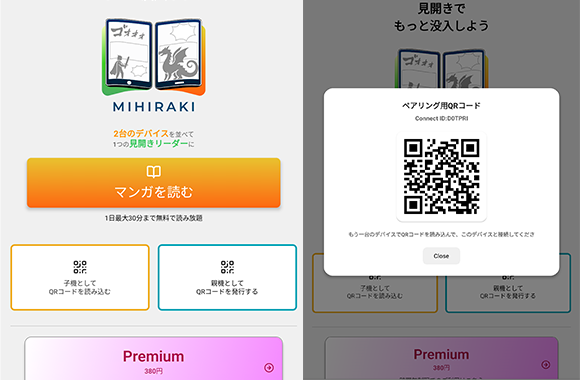
Choose "Show QR Code" on one device and "Scan QR Code" on the other. The device showing the code becomes the right page, the one scanning becomes the left page. Then open a title on the parent device.
Only one spare device? Try MIHIRAKI CLOCK
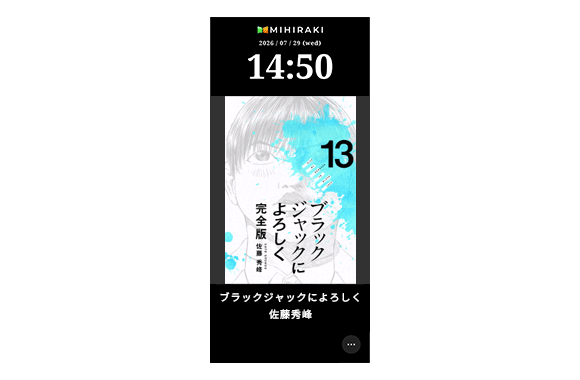
MIHIRAKI also includes a desk clock mode, MIHIRAKI CLOCK, that rotates the covers of your favorite manga.
Leave the spare phone on your desk while it charges and it becomes a digital clock that shows off your covers. You can set the rotation interval and a night mode.
FAQ
- Does it really work on an old phone?
- As a guide, iOS 15.5 or later and Android 7.0 or later. For anything older, check whether the OS can still be updated.
- Does it work without a SIM card?
- Yes. Syncing goes through the internet, so Wi-Fi is enough.
- What if the two screens are different sizes?
- It works, but if the screens differ a lot in size, the two pages of the spread will not match and it looks off. Two of the same model, or two with nearly the same screen size, work best.
- Is it free?
- The basics are free. The free plan shows ads and allows up to 30 minutes of spread reading per day. Premium ($2.99/month) removes the limit and the ads.
Make that phone in the drawer your second screen today
The app is free. Start by putting the spare device on charge.
Download for free and enjoy the two-page spread experience