How to turn your phone into a desk clock
iPhone and Android settings, plus a clock app with manga covers
The easiest job for the phone from your last upgrade is a desk clock. A plain clock, though, gets dull fast.
This page goes through the built-in options on iPhone and Android and their limits, then introduces MIHIRAKI CLOCK, which shows the time on top of the covers of your favorite manga.
Using the built-in features (iPhone / Android)
Both iPhone and Android can show a clock while charging without any extra app. Check first whether that is enough for you.
| iPhone (StandBy) | Android (Screen saver) | |
|---|---|---|
| When it shows | iOS 17 or later. Appears when the phone is charging and placed on its side | While charging (some devices also offer options such as charging in portrait) |
| How to set it up | Settings → StandBy → on, then plug in the charger and stand the phone sideways | Settings → Display → Screen saver, choose Clock, and set it to start while charging |
| What it can show | Clock, photos, widgets | Clock, photos (photo frame) and similar |
| Limits | Landscape only. On models without an Always-On display you need to set how long the screen stays on | Menu names and locations differ by maker and Android version. The look is mostly fixed |
Both can put a clock on the screen, but the looks are limited and you have to supply the photos yourself. If you want a clock that is also something to look at, the app below is a better fit.
Recommended: MIHIRAKI CLOCK, a desk clock with manga covers
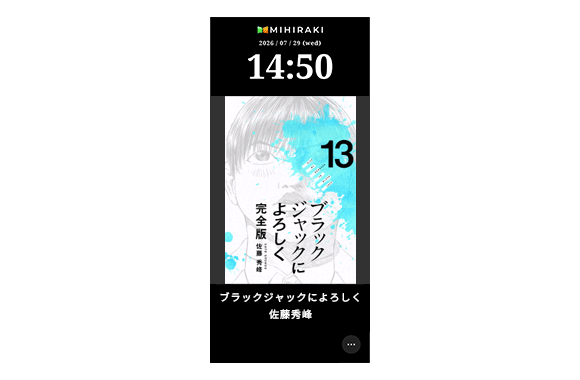
It is the clock mode built into the free MIHIRAKI app. Search for a manga title and save it, and the covers of that series rotate on screen with the date and time.
You keep a practical clock and put the mood of your favorite series on your desk or bedside.
- Covers of the series you choose rotate automatically (interval and order are adjustable)
- One device is enough. No pairing or sign-in needed
- Full-screen display that never sleeps. Night mode dims the screen
- Shifts the display a few pixels every few minutes to prevent burn-in
- Works on iPhone, iPad, Android phones and Android tablets
* Tapping a cover opens its page on Rakuten Books (PR) or an Amazon search. Cover data comes from Rakuten Books, so it currently covers manga published in Japan.
Getting started (3 steps)
-
1
Install the app and open MIHIRAKI CLOCK
Install MIHIRAKI for free and tap the MIHIRAKI CLOCK button on the home screen.
-
2
Choose a series
Open the menu (…) at the bottom right → Clock Settings, search for a title, narrow it down by series or author and save. Switch interval, display order and night mode are set here too.
-
3
Put it on charge
Connect the charging cable and place the phone on a stand. It works in both portrait and landscape.
Placement and tips for long-term use
- Keep it plugged in
- The screen stays on, so on battery alone it lasts only a few hours. Leave the cable connected.
- Use a stand
- Lying flat, the clock is hard to see. An inexpensive phone stand is all you need.
- Night mode at bedtime
- On a nightstand, turn on night mode in Clock Settings to dim the screen.
- Turn off notifications
- On a spare device, switch off notifications from apps you do not use so nothing interrupts the display. MIHIRAKI CLOCK keeps the screen awake by itself, so you do not need to change the auto-lock setting.
Have another spare device? Make a two-page manga reader
MIHIRAKI is first of all a manga reader that turns two devices placed side by side into one spread. Pair the device you use as a clock with your current phone via QR code and read digital manga like a paper book.
See what to do with a spare phone (how to set it up as a second screen)
FAQ
- Does it work on an old phone without a SIM card?
- Yes. Fetching covers needs an internet connection, so connect it to Wi-Fi.
- What about screen burn-in?
- MIHIRAKI CLOCK moves the whole display slightly every few minutes so the same image does not stay in one spot. On an OLED device used for long hours, night mode lowers the brightness for extra safety.
- Can I use a tablet?
- Yes. It runs on iPad and Android tablets, in landscape as well.
- Is it free?
- MIHIRAKI CLOCK is free. The spread reader is also free to use; Premium ($2.99/month) removes the daily time limit and the ads for spread reading.
Turn the phone in your drawer into a manga clock
The app is free. Enter one title and your desk looks different today.
Download for free and enjoy the two-page spread experience