How to Read Manga as a Two-Page Spread
On a phone or tablet, a spread that was one big picture on paper gets split into two separate pages.
This page compares the ways to read digital manga as a proper spread, and shows how to do it today with two devices you already have.
Give My Regards to Black Jack / SHUHO SATO
Digital manga does not reproduce the original spread
- Holding a phone upright shows one page at a time, so a spread is cut into two screens.
- Turning the phone sideways for two pages makes each page about three inches wide, too small to read the dialogue.
- Big panels drawn across two pages lose their impact when you can only see half at a time.
- Most manga apps do not offer a spread view on a single phone; when they do, it is limited to tablets in landscape.
Three ways to read manga as a spread
| Method | Cost | Spread size | What you can read | Spread angle |
|---|---|---|---|---|
| Foldable phone iPhone Duo, Galaxy Z Fold, etc. |
About $1,300–3,800 | Roughly a paperback spread | Any app that runs on the device | ○ the hinge opens like a book |
| One large tablet in landscape | About $400–1,200 | The screen is split in two, so each page is small | Only apps with a spread view | × one flat screen |
| Two devices side by side (MIHIRAKI) | From $0 a spare or used device is enough |
Two phones ≈ a paperback spread; two tablets ≈ magazine size or larger | Kindle Cloud Reader, MANGA Plus and your own files | ○ hold the two at an angle like a book |
A foldable is the most convenient option, but a four-figure price just for spreads is hard to justify. Pairing two devices lets you try it with hardware you already own.
How to make a spread with two phones or two tablets
-
STEP 01
Install MIHIRAKI on both devices
Get it from the App Store or Google Play on both devices. An iPhone and an Android device can be paired together.
-
STEP 02
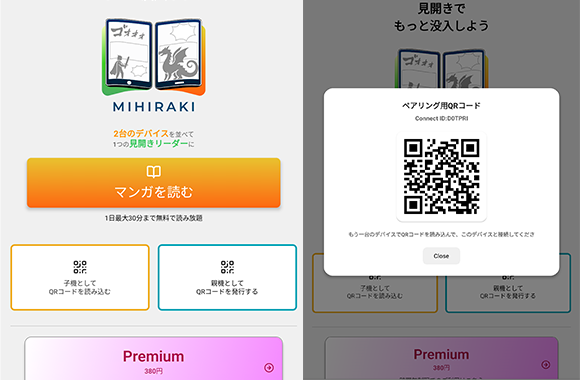
Pair them with a QR code
Choose "Show QR code" on one device and "Scan QR code" on the other. The device showing the code becomes the parent (right page) and the scanning device becomes the child (left page).
-
STEP 03
Open a title on the parent device
Pick a service on the parent device and open a title. The child device follows automatically and the pages split left and right.
-
STEP 04
Turn the pages
Both devices advance together when you turn a page. If a title is offset by one page, fix it from the spread-alignment option in the menu.
Reading Kindle manga as a spread
The Kindle phone app shows one page at a time; its spread view is limited to tablets in landscape.
MIHIRAKI works with the browser-based Kindle Cloud Reader, so the manga you already own opens as a spread across two devices. Just sign in with your Amazon account. No need to buy anything again.
Kindle two-page view by device, and what to check when it will not show
Supported services
The browser versions of Kindle Cloud Reader and MANGA Plus by SHUEISHA are supported.
Your own files (PDF / CBZ / ZIP) can be loaded from Dropbox, Google Drive, or a NAS (WebDAV).
Two tablets: magazine size and beyond
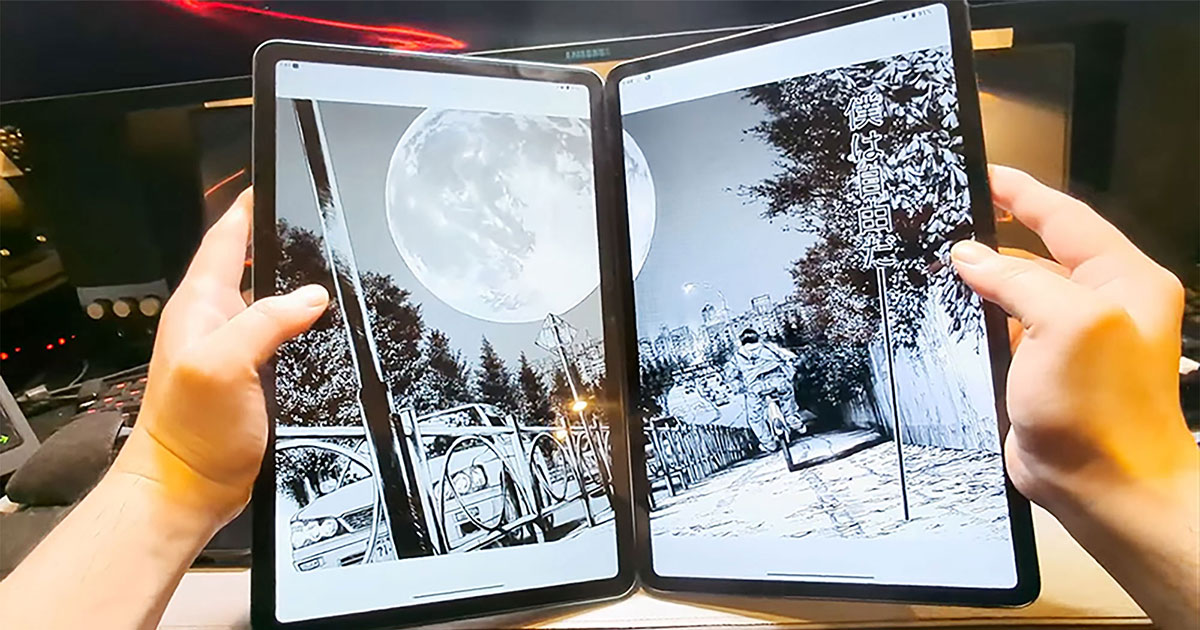
Two 10-inch tablets side by side match the spread of a weekly manga magazine, and larger tablets go beyond it. An old iPad and an Android tablet can be paired.
With an off-the-shelf stand or hinge attachment, you can hold the pair like a book.
A spare or used device is enough
- The phone you replaced, a hand-me-down from family, or a cheap used model works as the second device. Older models are fine.
- iOS and Android can be mixed.
- Different screen sizes still work, but a big difference makes the two pages mismatch, so two of the same model or a similar screen size work best.
FAQ
- Is it free?
- The basics are free. The free plan shows ads and allows up to 30 minutes of spread reading per day. Premium ($2.99/month) removes the limit and the ads.
- Do both devices need to be on the same Wi-Fi?
- No. Syncing goes through the internet, so it works as long as both devices are online. The same Wi-Fi works too, of course.
- Can I use it with a single phone?
- The spread feature needs two devices. Services and your own files are opened on the parent device. With a single device, MIHIRAKI CLOCK turns it into a desk clock that rotates your favorite manga covers.
Start reading spreads today with the two devices you have
The app is free to download. Start by taking that spare phone out of the drawer.
Download for free and enjoy the two-page spread experience