The best way to read manga on iPad
Page size by model, and how to get a bigger spread
An iPad is a good fit for manga, but a landscape spread makes each page smaller than you might expect.
This page sorts out the ways to read, the real page size by model, and how to get a bigger spread without replacing your iPad.
Three ways to read manga on an iPad
- 1. Store apps
- Kindle, MANGA Plus, and similar apps from the App Store. Buying and reading happen inside the app, and most of them show two pages when the iPad is turned to landscape.
- 2. Browser versions
- Kindle Cloud Reader and other web readers opened in Safari. Nothing to install, and books you already own open as they are. These browser versions are what MIHIRAKI uses for a two-device spread.
- 3. Your own scanned files
- PDF, ZIP, or CBZ files you scanned yourself, read in a reader app. The app comparison is on the page below.
How big is one page on each iPad size?
Calculated for a manga page (about 1 : 1.42) filling the screen. For reference, a printed manga volume is about 112 × 174 mm per page, a paperback 105 × 148 mm, and a weekly magazine (B5) 182 × 257 mm.
| iPad size | Upright (one page) | Landscape (one page of a spread) |
|---|---|---|
| 8-inch class iPad mini |
about 116 × 164 mm same width as print |
about 81 × 116 mm smaller than a paperback |
| 11-inch iPad / iPad Air / iPad Pro |
about 157 × 224 mm larger than A5 |
about 111 × 157 mm same width as print |
| 13-inch iPad Air / iPad Pro |
about 186 × 264 mm a little larger than a weekly magazine |
about 132 × 188 mm a little larger than B6 |
Held upright, even an 8-inch class iPad matches the width of a printed volume. In a spread, every size shrinks each page to about 70% of its upright width.
Spread size compared with a printed volume
An iPad in landscape, and an iPad with a second tablet beside it, drawn to the same scale as a printed manga volume.
A single iPad in landscape reaches printed size at about 13 inches, and the 13-inch iPad Air starts at ¥169,800. Two devices side by side go past A5 with two 11-inch screens, and reach weekly-magazine size (B5) with two 13-inch class screens. Spread width includes the seam between the two devices.
Why a landscape spread shrinks each page
A spread puts two pages side by side on one screen, so each page gets half the screen width. Compared with one page filling the screen upright, that is about 70% of the width and about half the area.
A 13-inch iPad gets one screen close to print, but it costs more and is heavier to carry.
Keep your iPad. Add an Android tablet as the second screen
Give My Regards to Black Jack / SHUHO SATO
The free app MIHIRAKI splits a spread across two devices, one showing the right page and the other the left, and turns both together. Each device shows one page, so the upright page size becomes the spread.
Rather than replacing the iPad, adding an Android tablet as the second device is the cheaper route. An iPad pairs with Android, and an 11-inch iPad beside an 11-inch class Android gives a spread larger than A5. 13-inch class Android tablets start in the ¥20,000s new.
Pick a second device with a screen width close to your iPad so the two pages match in size.
- Your current iPad stays in use. Your reading setup and purchased books are untouched; you only add a second device.
- Cheaper than upgrading. The 13-inch iPad Air starts at ¥169,800. An Android tablet starts in the ¥20,000s, and the spread comes out larger than a single 13-inch iPad.
- An old iPad works as the second device too. MIHIRAKI runs on iPadOS 15.5 or later, so the iPad left over from an upgrade can be the second screen.
Compare foldables, large tablets, and two devices side by side
Setting up an iPad and an Android tablet as one spread
-
STEP 01
Install MIHIRAKI on both
Free from the App Store on the iPad and Google Play on the Android tablet.
-
STEP 02
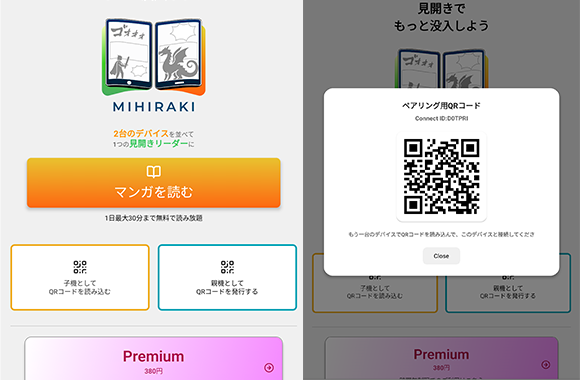
Pair them with a QR code
Choose "Show QR code" on one device and "Scan QR code" on the other. The device that showed the code takes the right page, the one that scanned it takes the left.
-
STEP 03
Open a title on the main device
Pick a service on the main device and open a title. The browser versions of Kindle and MANGA Plus are supported, along with your own files from Dropbox, Google Drive, or a NAS. The second device follows, and both turn together.
FAQ
- Is an iPad mini too small for manga?
- Held upright, one page is about the width of a printed volume, so it reads well. A landscape spread shrinks each page below a paperback, so for spreads two devices side by side work better.
- Can an old iPad be the second device?
- Yes. MIHIRAKI runs on iPadOS 15.5 or later, which covers iPad Air 2 and later, iPad mini 4 and later, iPad (5th generation) and later, and every iPad Pro.
- Does an iPad and Android pair work differently?
- No. Either can be the main device, and the second follows when you turn the page.
- Can I read books I bought on Kindle as a spread?
- Yes. MIHIRAKI uses the browser version, so signing in with your account opens the books you already own across the two devices.
- Do both devices need the same Wi-Fi?
- No. Syncing goes over the internet, so each device only needs a connection.
Keep your iPad, add a second device, read larger than print
The app is free to download. You can try it with the iPad and phone you already have.
Download for free and enjoy the two-page spread experience