What Size Tablet Do You Need for Manga?
Real Page Sizes vs. a Printed Volume
The inch number alone does not tell you how readable manga will be. What matters is how big one page appears next to a printed manga volume.
This page works out the real size of one page on tablets from 8 to 13 inches, and what it takes to read a two-page spread at printed size.
By screen size: how one page compares to print
A standard US manga volume is about 127 × 190 mm per page. A Japanese weekly manga magazine is B5, 182 × 257 mm.
| Tablet | One tablet, upright single page |
One tablet, landscape two-page spread |
Two tablets side by side spread (MIHIRAKI) |
|---|---|---|---|
| 8-inch class iPad mini, etc. |
About 116 × 164 mm a little smaller than print |
About 81 × 116 mm about 65% of print width |
About 116 × 164 mm a little smaller than print |
| 10.1-inch wide Android |
About 136 × 193 mm larger than print |
About 96 × 136 mm about 75% of print width |
About 136 × 193 mm larger than print |
| 11-inch iPad |
About 157 × 224 mm much larger than print |
About 111 × 157 mm about 85% of print width |
About 157 × 224 mm much larger than print |
| 11-inch wide Android |
About 148 × 210 mm larger than print |
About 104 × 148 mm about 80% of print width |
About 148 × 210 mm larger than print |
| 12.7-inch wide Android |
About 171 × 243 mm much larger than print |
About 120 × 171 mm a little smaller than print |
About 171 × 243 mm much larger than print |
| 13-inch iPad Air / Pro |
About 186 × 264 mm about a weekly magazine page |
About 132 × 188 mm about the same as print |
About 186 × 264 mm about a weekly magazine page |
| 13.4-inch wide Android |
About 180 × 256 mm about a weekly magazine page |
About 127 × 180 mm same width as print |
About 180 × 256 mm about a weekly magazine page |
Page sizes are calculated from the screen size and resolution of a typical model in each class, for a manga page (about 1:1.42) filling the screen. A landscape spread splits the screen into two pages, so one page has about half the area of the upright page. With two tablets side by side, each shows one page, so the upright page size becomes one side of the spread.
Each spread next to a printed manga volume
Here is each option showing a spread, drawn to the same scale. White is the manga page; black is unused screen and the device frame. The printed book is a standard US manga volume.
One tablet in landscape shows two pages on one screen. Two tablets are held upright side by side, one page on each.
A single tablet in landscape reaches printed size at about 13 inches. An 8-inch tablet held upright is close to print, but its landscape spread shrinks each page to about 65% of the printed width. Two 8-inch tablets side by side bring the spread back close to printed size. Spread width includes the seam between the two devices.
What two devices side by side look like
Give My Regards to Black Jack / SHUHO SATO
The same inch number does not mean the same page size
- The inch number is the diagonal
- At the same 11 inches, a screen with sides closer in length, like an iPad, and a wide 16:10 screen, like many Android tablets, have different short sides. Held upright, the width of one manga page is set by that short side.
- An 11-inch iPad and an 11-inch wide Android differ by 9 mm
- One page is about 157 mm wide on the iPad and about 148 mm on the wide Android. Some wide 12-inch models are still only about 157 mm, the same as an 11-inch iPad.
- In a landscape spread, a wide screen leaves empty space at the sides
- Two manga pages side by side have a shape of about 1.4 to 1. An iPad screen is close to that, so a landscape spread nearly fills it. A wide 16:10 Android leaves empty space on the left and right. The sizes in the table are the page itself, without that space.
For a spread at printed size, two tablets side by side is another way
To get a spread at printed size on a single tablet in landscape, you need the 13-inch class. A 13-inch iPad Air starts at $949; wide Android tablets of that size start around $200.
MIHIRAKI is a free app that splits the right and left pages across two devices and keeps page turns in sync. Each device shows one page, so the upright page size becomes the spread. Two 10.1-inch tablets already give pages larger than print, and two 11-inch tablets go well beyond it.
The difference from one screen is the seam. The device frames leave a seam of about 2 cm between the two.
- Just add one tablet to the one you have. An old tablet, a hand-me-down, or a cheap used model works as the second device.
- Two 13-inch-class tablets reach weekly-magazine size. Two 13.4-inch tablets give a page of about 180 × 256 mm, about a Japanese weekly manga magazine page. New 13-inch Android tablets start around $200, so a pair costs about $400.
- You can hold the two at an angle like a book. A single tablet is a flat screen; two devices open with an angle between the pages. An off-the-shelf attachment can join them.
- iPad and Android can be mixed. Different screen sizes still work, but two of a similar size work best.
- It does not depend on an app's spread view. It splits Kindle Cloud Reader, MANGA Plus, and your own files across the two devices.
Foldables, large tablets, and two devices compared by method
How to make a spread with two tablets
-
STEP 01
Install MIHIRAKI on both devices
Get it free from the App Store or Google Play on both devices. An iPad and an Android tablet can be paired together.
-
STEP 02
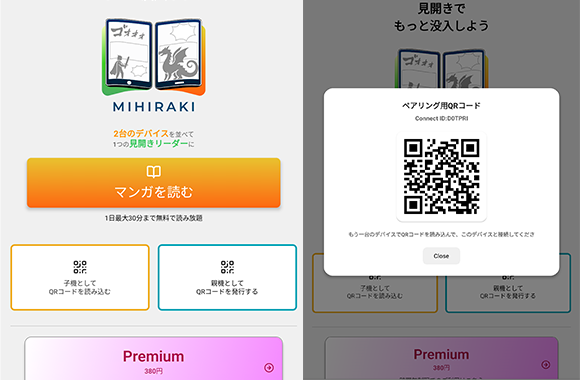
Pair them with a QR code
Choose "Show QR code" on one device and "Scan QR code" on the other. The device showing the code becomes the parent (right page) and the scanning device becomes the child (left page).
-
STEP 03
Open a title on the parent device
Pick a service on the parent device and open a title. The child device follows automatically and the pages split left and right.
-
STEP 04
Turn the pages
Both devices advance together when you turn a page. If a title is offset by one page, fix it from the spread-alignment option in the menu.
See the user guide for details on the controls.
Supported services
The browser versions of Kindle Cloud Reader and MANGA Plus by SHUEISHA are supported.
Your own files (PDF / CBZ / ZIP) can be loaded from Dropbox, Google Drive, or a NAS (WebDAV).
FAQ
- What size is enough for reading one page at a time?
- Held upright, an 8-inch tablet shows a page a little smaller than a printed volume, and a 10-inch tablet shows it larger than print.
- What size do I need for two-page spreads?
- On a single tablet in landscape, about 13 inches gives printed size; 11 inches gives about 85% of it. With two tablets side by side, two 8-inch tablets are already close to print and two 10.1-inch tablets exceed it.
- Is the seam between the two tablets distracting?
- Two tablets leave a seam of about 2 cm. It sits in the middle, where the gutter of a printed book is. A single picture drawn across both pages will have a line down the middle.
- Can the two screens be different sizes?
- Yes. A big difference makes the two pages mismatch in height, so two of the same model or a similar screen size work best.
- I only have one tablet
- A tablet and a phone can be paired, but the page sizes will not match, so a second device of a similar size works best. With a single device, MIHIRAKI CLOCK turns it into a desk clock that rotates your favorite manga covers.
- Is it free?
- The basics are free. The free plan shows ads and allows up to 30 minutes of spread reading per day. Premium ($2.99/month) removes the limit and the ads.
Before buying another tablet, try a spread with the two devices you have
The app is free to download. You can try it with two phones, too.
Download for free and enjoy the two-page spread experience