Manga reader apps for scanned comics, compared
Reading your own scanned manga on a phone or tablet takes a reader that matches your file format, where the files live, and how you want them shown.
This page compares the established readers on the same points, then adds one more option: two devices side by side as a single spread.
Five things to check when choosing a reader
- 1. Formats (PDF / ZIP / CBZ / RAR)
- Scanned manga is usually a ZIP of JPEGs (CBZ) or a PDF from the scanner. RAR and CBR support is less common.
- 2. Where the files live
- Copied to the device, or read directly from a NAS (SMB / WebDAV) or cloud storage (Dropbox / Google Drive). The larger the library, the more it helps to keep files off the device.
- 3. Two-page view
- Whether landscape shows two pages, and whether wide spread images can be split or joined. On one screen, each page of a spread is small.
- 4. Platform
- Most readers are Android-only or iOS-only. Few work the same way on both.
- 5. Price and ads
- Free (with ads or optional donations), one-time purchase, or subscription. Scanned libraries are used for years, so a one-time price is rarely the deciding factor.
Comparison table
| App | Platform | Price | Formats | Cloud / NAS | Two-page view |
|---|---|---|---|---|---|
| Perfect Viewer | Android | Free donation unlocks extras |
ZIP / CBZ / RAR / 7z and more PDF via free plugin |
Google Drive, Dropbox, OneDrive, Box, SMB, FTP, WebDAV | Automatic in landscape |
| ComicScreen | Android | Free ads, paid removal |
ZIP / CBZ / RAR / CBR / PDF | Google Drive, Dropbox, SMB, FTP | Splits and joins spreads |
| SideBooks | iOS / Android | Free | PDF / ZIP / CBZ / RAR / CBR | Dropbox, Google Drive, OneDrive downloads to the device |
Landscape |
| ComicGlass | iOS | ¥600 one-time |
ZIP / CBZ / RAR / 7z / PDF | Google Drive, Dropbox, OneDrive, Box, iCloud, NAS (SMB) | Landscape, margin crop |
| i-Bunko HD | iPad | ¥1,100 one-time |
PDF / ZIP (images, text) | Transfer to the device | Landscape |
| MIHIRAKI | iOS / Android | Free Premium $2.99/month for unlimited time |
PDF / ZIP / CBZ | Dropbox, Google Drive, NAS (WebDAV) | One spread across two devices also web versions of Kindle and MANGA Plus |
Prices and features are based on public information as of September 2026. Check each store for the latest details.
Each app in brief
- Perfect Viewer (Android)
- Android only. Handles ZIP / RAR / 7z archives, with PDF through a separate plugin. Many NAS and cloud connections, but also many settings to learn. Built for reading on one screen.
- ComicScreen (Android)
- Android only. Handles ZIP / RAR / PDF and connects to a NAS over SMB or FTP. The free version shows ads. Built for reading on one screen.
- SideBooks (iOS / Android)
- Handles PDF / ZIP / RAR. Cloud files are downloaded to the device before reading, so they take up storage. Built for reading on one screen.
- ComicGlass (iOS)
- iOS only, ¥600 one-time. Handles ZIP / RAR / PDF and reads from a NAS (SMB) or the cloud. Not available on Android. Built for reading on one screen.
- i-Bunko HD (iPad)
- iPad only, ¥1,100 one-time. Handles PDF and ZIP, transferred to the device. Not available on iPhone or Android.
- MIHIRAKI (iOS / Android)
- Where the others compete on how to use one screen, MIHIRAKI places two devices side by side as one spread. It reads PDF / ZIP / CBZ from Dropbox, Google Drive, or a NAS, and also shows the web versions of Kindle and MANGA Plus.
If the size of the spread matters, use two devices
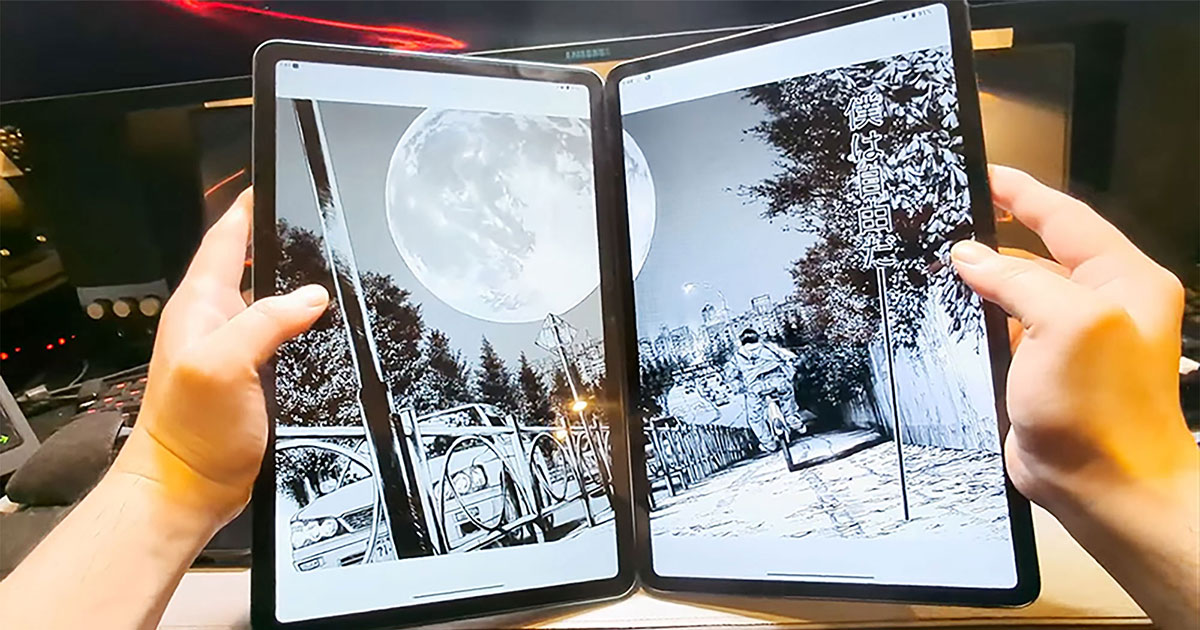
In any reader, landscape on one device gives each page half the screen. On a phone that is under 3 inches, and you zoom to read the dialogue.
MIHIRAKI installs on two devices linked by a QR code, with one showing the right page and the other the left. Two phones give a paperback-size spread, two 10-inch tablets match or exceed a weekly magazine, and a spare or used device costs nothing.
Compare foldables, large tablets, and two devices side by side
Recommendations by where your files live
- On a NAS (home server)
- MIHIRAKI connects to the NAS over WebDAV and reads without copying files to the device. On Synology, QNAP, and similar, just enable the WebDAV server. Both devices read from the same NAS, so nothing has to be copied around.
- In Dropbox or Google Drive
- MIHIRAKI opens files in Dropbox and Google Drive as they are. Two-device spreads work away from home, with no NAS required.
- Copied to the device
- MIHIRAKI is built around cloud or NAS storage. Put files that live on one device into Dropbox or similar, and the second device can open the same file.
FAQ
- Can I read RAR (CBR) files?
- MIHIRAKI supports PDF / ZIP / CBZ. Repack RAR files as ZIP and they will open.
- PDF or ZIP (CBZ), which is better?
- For manga, a ZIP / CBZ of images is lighter and easier to control for spreads. PDF (with OCR) suits text books and anything you want to search.
- Is there one app for both iPhone and Android?
- MIHIRAKI runs on both, and can pair an iPhone with an Android device for a spread.
- Does the MIHIRAKI spread work on a single device?
- The spread feature needs two devices; a spare or used phone works as the second one. With a single device, MIHIRAKI CLOCK turns it into a desk clock that shows your manga covers.
Your scanned manga, at print size across two devices
The app is free and opens files from Dropbox, Google Drive, or a NAS as they are.
Download for free and enjoy the two-page spread experience