How to read ZIP / CBZ manga on iPhone, and which apps to use
ZIP and CBZ files of books you scanned yourself, or bought DRM-free, read well on an iPhone.
This page covers how to get the files onto the phone and how the reader apps differ.
Why an iPhone cannot read ZIP manga on its own
The Files app on iPhone can unpack a ZIP, but what you get is a folder of single images. There is no page turning, no two-page landscape view, and no memory of where you stopped.
To read a ZIP or CBZ (the same bundle of images with a different extension) as manga, you need a reader app that opens the archive directly.
Three ways to get ZIP files onto an iPhone
- 1. Copy from a computer into the Files app
- AirDrop from a Mac, or USB (file sharing in iTunes / Apple Devices) or iCloud Drive from Windows, into Files on the iPhone. This uses the phone's storage, so it suits loading only what you are reading now. SideBooks and ComicGlass read files this way.
- 2. Put them in Dropbox or Google Drive
- Upload from the computer and open from the app on the iPhone. No transfer step, and a second device can open the same file. This is how MIHIRAKI works: it reads ZIP, CBZ, and PDF from Dropbox and Google Drive as they are.
- 3. Keep them on a NAS (home server)
- For a large library, keep everything on a NAS and read over Wi-Fi. ComicGlass connects over SMB, MIHIRAKI over WebDAV. On Synology, QNAP, and similar, just enable the WebDAV server.
iPhone apps that open ZIP / CBZ, compared
| App | Price | Formats | Where the files live | Two-page view |
|---|---|---|---|---|
| Files app (built in) | Free | Unpacks ZIP only | On the iPhone, iCloud Drive | No (one image at a time) |
| SideBooks | Free | PDF / ZIP / CBZ / RAR / CBR | On the iPhone downloads from Dropbox, Google Drive, OneDrive |
Landscape |
| ComicGlass | ¥600 one-time |
ZIP / CBZ / RAR / 7z / PDF | On the iPhone, iCloud, Google Drive, Dropbox, OneDrive, Box, NAS (SMB) | Landscape, margin crop |
| MIHIRAKI | Free Premium $2.99/month for unlimited time |
ZIP / CBZ / PDF | Dropbox, Google Drive, NAS (WebDAV) reads without copying to the device |
One spread across two devices |
Prices and features are from public information as of September 2026. Check each store for the latest.
Opening a ZIP from Dropbox in MIHIRAKI
-
STEP 01
Put the ZIP or CBZ in Dropbox
Upload it from your computer to a Dropbox folder. Google Drive and a NAS (WebDAV) work the same way.
-
STEP 02
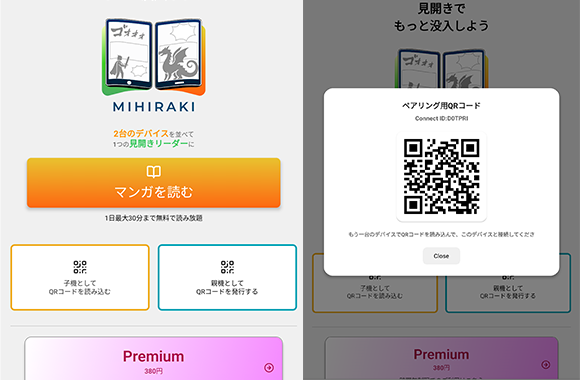
Install MIHIRAKI on two devices and pair them with a QR code
Install free from the App Store or Google Play. Choose "Show QR code" on one device and "Scan QR code" on the other, and the two are linked.
-
STEP 03
Choose Dropbox on the main device and open the file
Pick Dropbox from the service list on the main device, sign in, and open the file. The right and left pages appear on the two devices, and both turn together.
A spread on one iPhone is small. Two side by side match print
Give My Regards to Black Jack / SHUHO SATO
In any reader, landscape on an iPhone gives each page under 3 inches, and you zoom to read the dialogue.
MIHIRAKI installs on two devices linked by a QR code, with one showing the right page and the other the left. Two iPhones give a paperback-size spread, and the iPhone or Android phone left over from your last upgrade makes the second device free. An iPad can be paired as well.
Compare foldables, large tablets, and two devices side by side
FAQ
- What is the difference between ZIP and CBZ?
- Nothing inside. CBZ is a ZIP renamed to mark it as a comic, and renaming it back to .zip still works. MIHIRAKI opens both.
- Can I read RAR (CBR) files?
- MIHIRAKI supports ZIP / CBZ / PDF. Repack RAR files as ZIP on a computer and they will open.
- Can MIHIRAKI open a ZIP stored on the iPhone itself?
- MIHIRAKI reads files kept in Dropbox, Google Drive, or a NAS (WebDAV). Move a ZIP from the iPhone into a Dropbox folder and the second device can open the same file too.
- Does it work on iPad?
- Yes. An iPhone with an iPad, or an iPad with an Android tablet, can also form a spread.
- Can the second device be an Android phone?
- Yes. MIHIRAKI runs on both iOS and Android, so a spare Android phone works as the second device.
Your scanned ZIP / CBZ, at print size across two devices
The app is free and opens files from Dropbox, Google Drive, or a NAS as they are.
Download for free and enjoy the two-page spread experience